What I’m Using AI For in Mid-2026
I’ve written before about what I’m using AI for, first at the end of 2023 and then again in early 2025. Looking back, the list has not changed dramatically. What has changed is that my use of AI has evolved alongside the way my work has evolved. Some tasks have become more important, others have faded into the background, and new use cases have emerged since my tasks at work have also changed quite some.
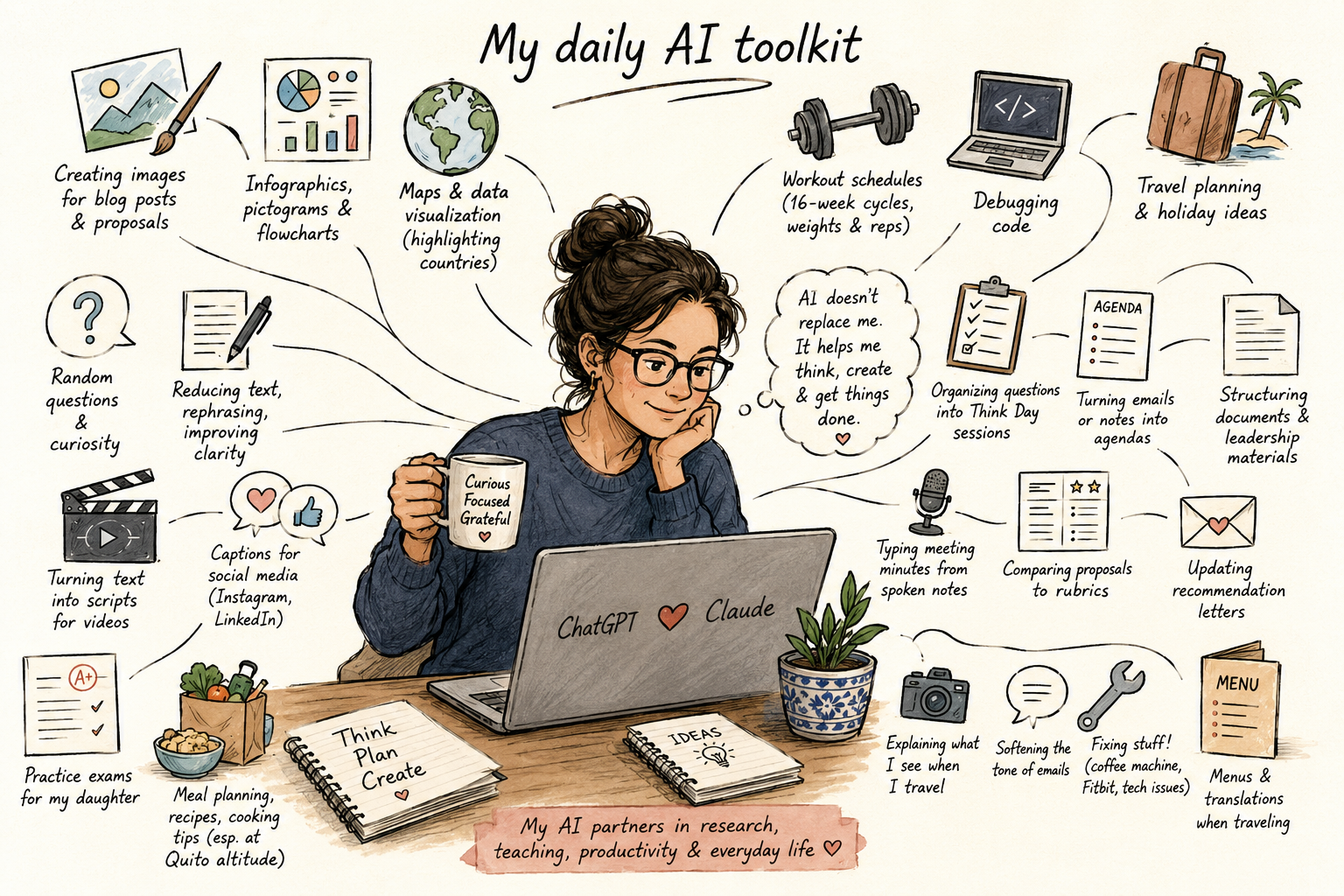
These days, I use AI pretty much every day. I tend to switch between ChatGPT and Claude depending on the task. In general, I prefer ChatGPT for image generation and visual tasks, while I often turn to Claude for longer-form work such as drafting presentations. In my experience, Claude does a particularly good job of helping structure presentations.
Here’s a snapshot of what I’m currently using AI for:
- Creating images for blog posts, presentations, and social media. Over time, my blog images have shifted from painterly illustrations to infographic-style visuals that better fit the content.
- Developing proposal graphics, including flowcharts, process diagrams, pictograms, and visual summaries of project activities.
- Generating maps for international projects by highlighting participating countries using simple programming workflows. I do use the programming option to make sure the world map gets loaded correctly.
- Answering everyday questions, from travel logistics to practical life questions. Recent examples include aftercare advice following a spray tan and cooking questions.
- Meal planning and recipe adaptation, especially adjusting recipes based on available ingredients and accounting for the altitude of Quito when cooking (boiling things, essentially).
- Reducing and rephrasing text, particularly when a sentence feels unclear or too long.
- Turning written content into video scripts for recordings and online content.
- Creating captions for LinkedIn and Instagram based on templates I’ve developed for my own writing style.
- Generating practice exams for my daughter by uploading study materials and creating mock tests to help her prepare.
- Planning training cycles, where I use AI to calculate the weekly weights, repetitions, and progression for my 16-week strength training programs.
- Debugging and expanding code. I still prefer writing the main structure myself, but AI is very useful for troubleshooting and extending functionality.
- Planning holidays and travel, from itinerary ideas to practical recommendations.
- Supporting Think Days, including gathering information, organizing questions, and helping me structure topics for reflection and analysis.
- Drafting meeting agendas from collections of emails, notes, or discussion points.
- Structuring leadership documents, helping transform rough ideas into clear discussion papers and briefing documents.
- Comparing proposal drafts against evaluation rubrics to identify missing elements before submission.
- Tailoring recommendation letters, starting from my own templates and adapting sections to specific award or fellowship calls.
- Identifying infrastructure and landmarks while traveling. When I see something interesting, I often ask AI to help me understand what I’m looking at. For example, during a recent trip to Panama, I used it to identify a large elevated light rail viaduct and then read up about the construction project.
- Softening the tone of emails when I want to make a response more diplomatic or constructive.
- Troubleshooting technology, including diagnosing problems with appliances and devices. AI recently helped me resolve issues with both a coffee machine and my Fitbit settings.
- Translating menus while traveling, particularly identifying vegetarian options when I don’t speak the local language.
One caveat that has become increasingly important is the responsible use of AI in professional work. In civil engineering, for example, there are often restrictions regarding copyrighted materials. Certain organizations, such as the American Concrete Institute, explicitly prohibit uploading their copyrighted documents to AI systems. As such, understanding what can and cannot be shared remains an important part of using these tools responsibly.
Overall, AI has become less of a novelty and more of a practical assistant. Most of the tasks above are not revolutionary on their own, but together they save time, reduce friction, and help me move more efficiently between the many different roles I have to juggle. Looking back at my previous snapshots, the biggest change is perhaps not what I use AI for, but how seamlessly it has become integrated into my daily routines.
What do you use AI for?