Using different AI tools
Over the past year, AI tools have become a regular part of my workflow. I have a subscription to both ChatGPT and Claude, and I use both platforms almost daily. At first, I treated them as more or less interchangeable: ask a question here, paste a text there, see what comes out. But over time, I have started to notice that each tool has its own strengths, and that I get the best results when I use them deliberately.
I don’t think of this as a matter of one tool being “better” than the other. For me, the question is more practical: which tool is better suited for which task? In the same way that I use different tools for different parts of my work, I now use ChatGPT and Claude for different types of writing, checking, and creating.
Here is how I currently divide my work between the two.
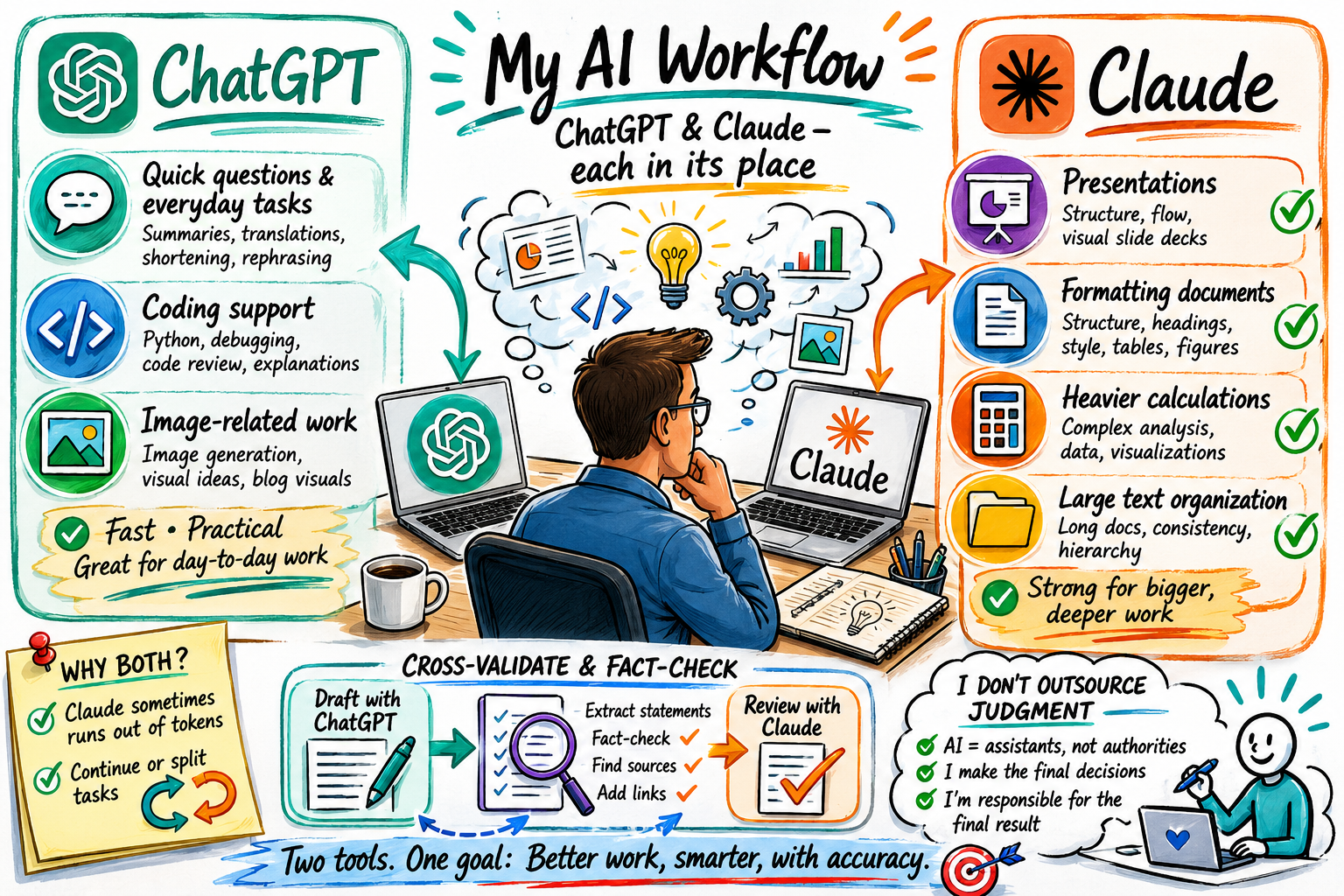
- I use ChatGPT for lighter, everyday tasks.
ChatGPT is often my first stop for quick questions, small writing tasks, translations, summaries, and shortening text. When I need to rephrase a paragraph, make an email sound clearer, reduce a text to a certain word count, or ask a random question that comes up during the day, I usually turn to ChatGPT. It feels fast and practical for these smaller pieces of work. - I use ChatGPT for coding support.
For regular Python coding, debugging, and checking code, ChatGPT works well for me. I may ask it to look over a script, explain an error message, suggest a cleaner structure, or help me understand why a piece of code is not doing what I expected. For the kind of day-to-day coding support I need, ChatGPT is usually sufficient. - I use ChatGPT for image-related work.
When I want to generate or work with images, I prefer ChatGPT. It is my go-to tool for visual ideas, image generation, and related creative tasks. For blog-related work, this can be useful when I am thinking about illustrations, visuals, or ways to communicate an idea more clearly. - I use Claude for presentations.
Claude is currently my preferred tool for working on presentations. I find it helpful for structuring slide decks, improving the flow of a presentation, and making sure everything has the same overall look. When I am preparing a talk, lecture, or workshop, Claude often helps me turn my bullet points into more visual contents. - I use Claude for formatting documents.
I also like Claude for document formatting and heavier text organization. When I have a long or messy document, Claude can be useful for bringing structure to it. I may ask it to organize sections, improve headings, create a clearer hierarchy, or make the document more consistent – and more than anything: develop the overall visual style of the headings, tables, and figures. For these tasks, Claude often feels strong in handling larger chunks of material. - I use Claude for heavier calculation work.
For more demanding calculation-related tasks, I tend to use Claude. This does not mean that I blindly trust whatever comes out. These tasks are typically bringing together of information from different sources that I have available, visualizations, etc. - I use both tools because Claude sometimes runs out of tokens.
One very practical reason for keeping both subscriptions is that Claude sometimes reaches its limits when I am working with long documents or large tasks. When that happens, I can continue the work in ChatGPT, or split the task between the two. This may sound like a small thing, but in a busy workday, being able to continue instead of stopping can make a difference. - I cross-validate between ChatGPT and Claude.
One of the most useful parts of my workflow is using both tools to check each other. For example, I may work with ChatGPT on a text first. Once I have a draft, I paste it into Claude and ask it to pull out all the statements that need to be fact-checked. Then I ask Claude to fact-check those statements and provide links. This process helps me avoid treating AI-generated or AI-edited text as automatically correct. - I don’t outsource judgment to either platform.
Even though both tools are useful, I still see them as assistants rather than authorities. I use them to speed up tasks, generate alternatives, check structure, format documents to the right color palette and create images. But I remain responsible for the final text, the final calculation, the final slide deck, and the final decision.
In the end, my workflow is not “ChatGPT versus Claude” as much as “ChatGPT and Claude, each in its place.” ChatGPT is my tool for quick questions, shorter writing tasks, translations, coding help, and images. Claude is my tool for presentations, document formatting, longer text organization, and heavier calculation work. And when accuracy matters, I use them together: one to draft or improve, the other to question and fact-check. For me, that combination is where the real value lies.